Tibia bot for Linux
Use EchoBot on Linux with Ubuntu 22.04 or later. Learn where to get the Linux launcher and configure Cavebot, healing, targeting and looting.
Updated · EchoBot setup guide
Linux support and Ubuntu compatibility
EchoBot provides a Linux version alongside its macOS version. Ubuntu 22.04 is the minimum supported release. The Linux release targets GLIBC 2.35 compatibility; this does not mean that every Linux distribution or custom client environment has been tested. Confirm your installed Tibia client version with the team when setting up access.
Download the Linux launcher
Arrange access through the EchoBot Discord using 400 Tibia Coins or $20 USD. Once you receive your login, open the user panel, check your license and choose the Linux launcher. Download the launcher for Linux rather than the separate macOS package.
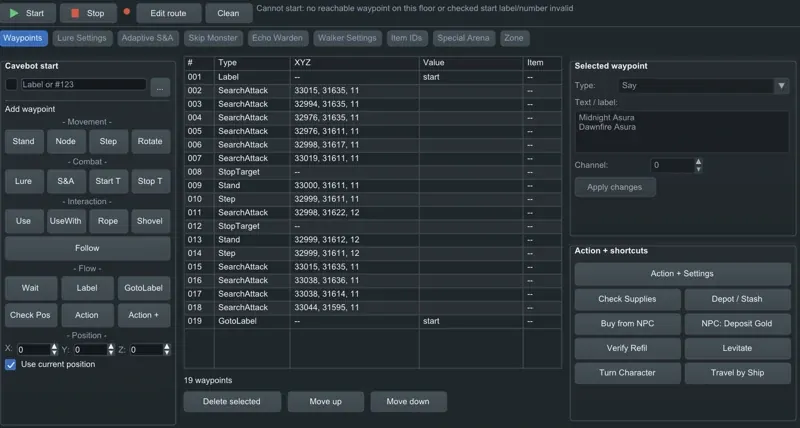
Set up your first Linux profile
Open the launcher, sign in and use the bot interface to manage your character. Begin with your vocation and healing setup: set HP and mana thresholds, select spells or potions and choose rule priorities. Add targeting rules for the creatures you intend to fight, including their priorities, modes and preferred combat distance.
Connect navigation, combat and loot
Create a Cavebot route from waypoints and actions. Configure tool use and floor changes where your route requires them. Set the looter timing, range and input method for the same character. Use the loaded minimap to inspect your route and creature positions, then save the profile before switching to a different hunt.
Client updates and release information
A Tibia client update can require an EchoBot update. Check the Discord for current build information if the launcher or bot reports a compatibility problem. Include your Linux distribution and client version when asking for setup help. Do not replace your system glibc to make a newer incompatible package run.
Get access and setup help
Sign in to your EchoBot account for your license and downloads, or join Discord to arrange access.
Join EchoBot on Discord ↗