Tibia bot for macOS
EchoBot for macOS: explore Cavebot, healing, targeting and looting. See how to get the Mac launcher, configure a character and save your profile.
Updated · EchoBot setup guide
A Mac version of EchoBot
EchoBot provides a macOS version for players who want Cavebot navigation, configurable healing, target selection and looting in one panel. This page explains the Mac workflow; it is not a Windows installation guide or an OTClient configuration. Check the current Tibia client compatibility with the EchoBot team before arranging access.
Get the macOS launcher
There is one access option: 400 Tibia Coins or $20 USD. Contact the EchoBot Discord to confirm the details and receive your account login. Then sign in to the user panel and choose the macOS launcher from your available downloads. The user panel also shows your license status.
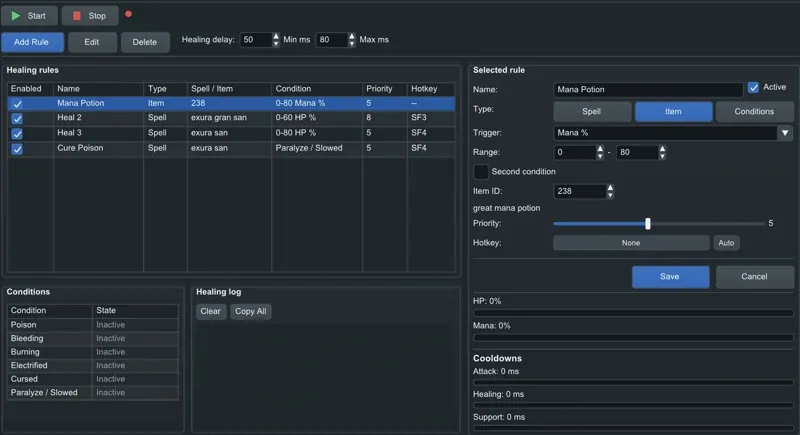
Configure your character on Mac
After opening the launcher and signing in, use the Main panel to manage your client. Choose your character profile before editing individual modules. Start with healing rules for your vocation: configure health and mana conditions, choose spells or items, and assign priorities. Targeting controls which monsters to attack and which distance to maintain.
Build a route and save the profile
Use Cavebot to add waypoints and actions for a specific hunting ground. Floor transitions, tool actions and the selected start point belong to the route configuration. The minimap provides an overview of loaded map data and waypoint markers. Save your configuration so you can return to the same settings in another session.
Mac and Linux: choose the right download
The product has macOS and Linux versions, but each needs its own launcher. Use the macOS download on your Mac. If you also use Ubuntu, read the Linux setup page for its minimum supported distribution. Current client compatibility and release information are available on Discord.
Get access and setup help
Sign in to your EchoBot account for your license and downloads, or join Discord to arrange access.
Join EchoBot on Discord ↗