Tibia Cavebot configuration guide
Configure EchoBot Cavebot routes: waypoints, start labels, floor changes and tool actions. Connect your route with targeting, healing and looting.
Updated · EchoBot setup guide
What a Cavebot route contains
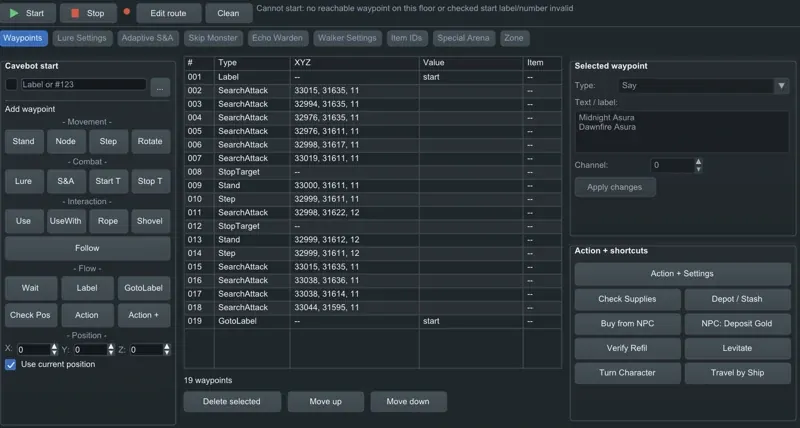
A Cavebot route describes movement and actions for a hunting ground. In EchoBot, the waypoint list includes entries such as Label, SearchAttack, StopTarget, Stand, Step and GotoLabel. Each action has a purpose: a label identifies a place in the route, movement entries describe the path, and combat entries coordinate movement with targeting.
Choose a start point that fits the route
Open the Cavebot tab and select the profile for the hunting ground. Check the waypoint coordinates and floor before starting. If you choose a start label or waypoint number, make sure it exists. A message about no reachable waypoint or an invalid checked start label is a route-start issue: verify the character position, floor and selected start entry.
Use the right waypoint and action
Use movement entries for ordinary steps and standing positions. Add interaction actions where the route needs a door, an object or a tool. Rope and Shovel are separate options in the editor. Routes that use stairs or other floor transitions need entries that match the actual connection between floors. Review each transition rather than treating every waypoint as an ordinary walk command.
Coordinate Cavebot with targeting and healing
A route alone does not define every combat decision. In Targeting, add the relevant monster names, set priorities and choose modes such as Stand or Chase. Configure healing and mana thresholds in Healer before using the route. Spells provides separate attack rules, including monster filters, monster count and priorities.
Review looting, minimap and saved profiles
Set the looter delay, range and input method for the same hunt. If you use a blessed wooden stake or obsidian knife, review their conditions in Looting. Inspect the loaded minimap for route markers and creature positions. Save the profile and check it again after changing a waypoint, switching hunting grounds or updating the client.
Get access and setup help
Sign in to your EchoBot account for your license and downloads, or join Discord to arrange access.
Join EchoBot on Discord ↗